For a professional, print-ready full-color, 8.5″ x 11″ magazine ad, you need to provide the following:
1. Correct Final Size & Bleed
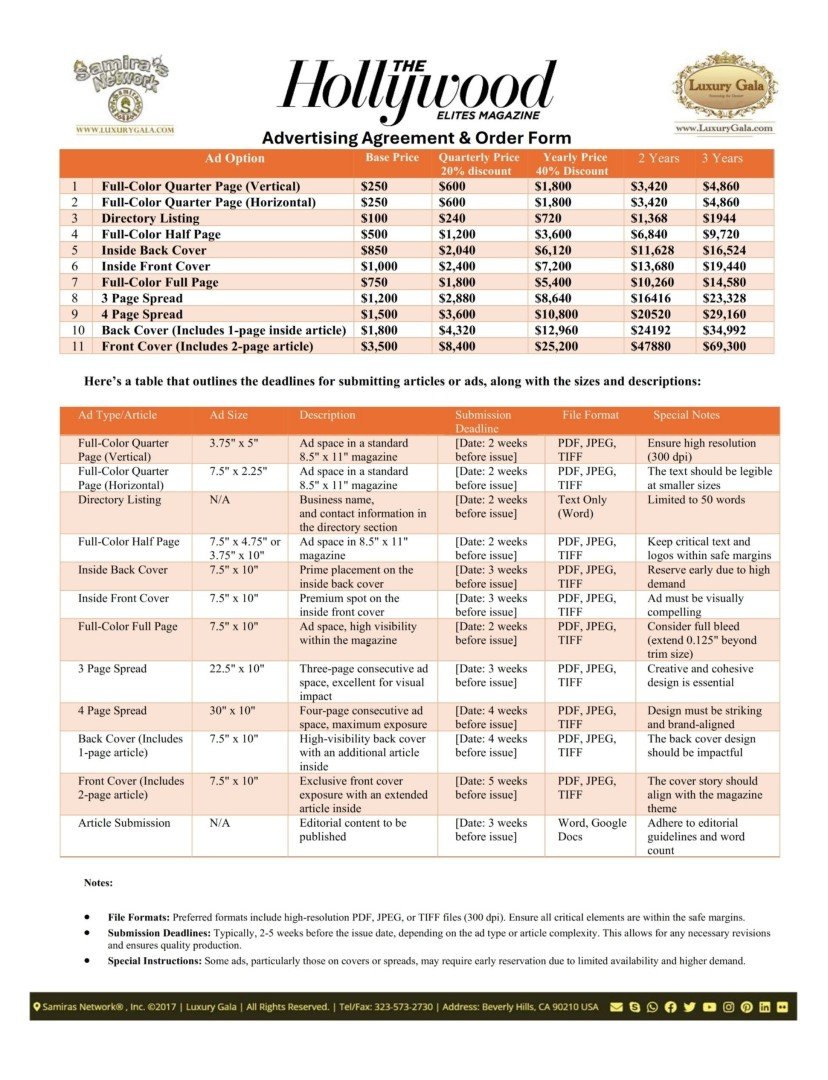
- Live Area: 8.5″ x 11″ is the final trimmed size.
- Bleed: Extend background colors/images 0.125″ (1/8 inch) beyond each edge. Your supplied file should be 8.75″ x 11.25″ (8.5″ + 0.125″ on left & right, 11″ + 0.125″ on top & bottom).
- Safe Margin: Keep all critical text and logos at least 0.25″ (1/4 inch) inside from the trim edge to avoid accidental cropping.
2. High-Resolution Images
- 300 PPI (Pixels Per Inch) at final size (8.5″ x 11″).
- Use high-quality photos/illustrations. Do not stretch low-resolution web images.
3. Correct Color Mode: CMYK
- Design must be in CMYK color mode, not RGB (used for screens). This ensures accurate color reproduction on press.
- For specific brand colors, use Pantone (PMS) spot color references if an exact match is critical (may incur extra cost).
4. Proper File Format & Setup
- Preferred Format: PDF/X-1a is the industry standard.
- Also Acceptable: High-resolution press-ready Adobe InDesign, Illustrator, or Photoshop files with fonts outlined and links embedded.
- Fonts: Outline all text (convert to vector paths) or package all font files with your submission.
5. Inclusion of Printer’s Marks (Optional but Helpful)
- Include crop marks showing the trim line.
- If required, include registration marks and a color bar.
Quick Checklist for Submission:
-
☐ File size: 8.75″ x 11.25″ (with bleed)
-
☐ 300 PPI resolution
-
☐ CMYK color mode
-
☐ Fonts outlined
-
☐ Saved as PDF/X-1a
-
☐ Critical content inside safe margin
Always confirm final specifications with the magazine’s production department, as requirements can vary. Providing a correctly prepared file prevents delays, extra costs, and ensures your ad looks exactly as intended.